
Declining to Sign a Document
Learn the proper procedure for rejecting a document when you find errors, disagree with the terms, or are not the intended signer.
Understanding Document Declination
Declining to sign is a definitive action that stops the workflow for a document. It is primarily used when there are material errors in the contract, missing information, or if you simply do not agree to the terms presented.
Irreversible Action
Once you decline a document, the entire envelope is voided for all parties. You cannot "undo" a decline; the sender will need to create and send a completely new envelope.
Steps to Decline a Document
If you have reviewed the document and decided not to sign, follow these steps:
- Open the document using the link provided in the email notification.
- Review the content to confirm your decision.
- Locate the More Options dropdown menu, from top navigation bar.
- Select Decline to Sign from the dropdown options.
- In the dialog that appears, enter a required reason for your decision. This reason will be visible to the sender.
- Click the Decline button to confirm.
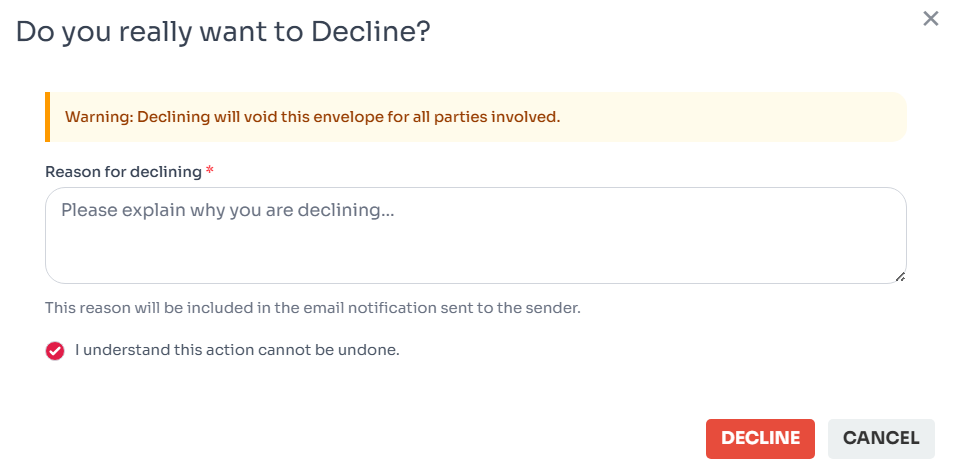
Figure 1: Document decline dialog.
Impact of Declining
When a signer declines a document, several automated processes are triggered to maintain the integrity of the transaction:
- Immediate Void: The document status changes to "Declined" (which acts as a Void). No other signers will be able to view or sign the document.
- Notifications Sent: The sender receives an email notification immediately stating that the document was declined, including the reason you provided.
- Audit Log: The action, timestamp, and reason for declining are permanently recorded in the document's history/audit trail.
Troubleshooting Declination Issues
Here are some common questions and issues regarding the decline process:
Option Missing
The sender may have disabled the "Decline to Sign" option for this specific document.
Accidental Decline
If you declined by mistake, contact the sender immediately. They must send a new document.
Mobile View
On mobile, the decline option is often nested under the "More" menu at the bottom.
Change Reason
You cannot edit the decline reason after submission. Send a follow-up email to the sender if needed.
list_alt On This Page
Related Articles
Need more help?
If you can't find what you're looking for, our support team is here to assist you.
Contact Support