
Changing a Document's Signer
Learn how to correct a signer's email address, update their name, or reassign a document to a completely different person, or assign to someone else after an document has already been sent.
Understanding Signer Reassignment
Reassigning a signer is a crucial feature when you've accidentally sent a document to the wrong email address or when the intended signer is unavailable and delegates the signing authority to someone else.
Important Constraint
You can only change a signer's details if they have not yet signed the document. Once a signer has completed their action, their details are locked to preserve the legal audit trail.
Steps to Change a Signer
Follow these steps to update signer information for an in-flight document:
- Navigate to the Document List page and locate the document you wish to modify.
- Click on the View Details to open the Document Details view.
- Locate the signer you need to change in the "Signers" list from Right Panel.
- Hover on their name and select Replace Signer button.
- Update the Name and Email Address fields in the modal that appears.
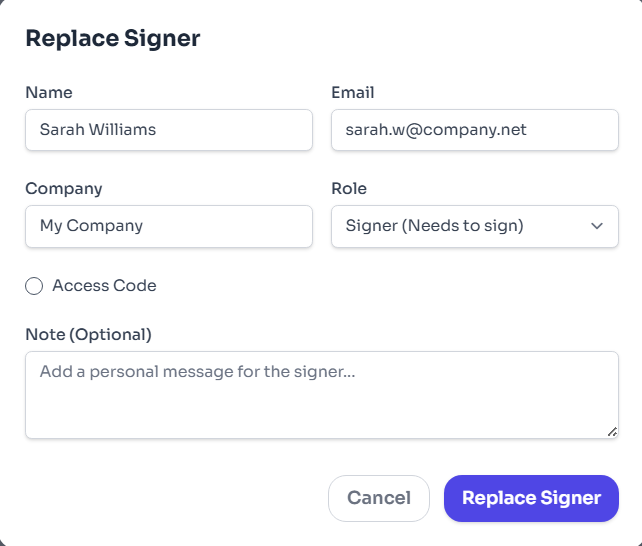
Figure 3: Select Signature Style.
What Happens After Reassignment
Once you confirm the changes, several automated actions occur to ensure security and clarity:
- New Notification: The new signer (or the existing signer at the new email address) receives a fresh email notification with a unique link to access the document.
- Link Invalidation: The link previously sent to the old email address is immediately invalidated. If the previous signer tries to access it, they will see an error message stating the document is no longer available.
- Audit Trail Update: The Certificate of Completion is updated to reflect the correction event, noting who made the change and when.
Troubleshooting Signer Changes
Encountering issues while trying to change a signer? Here are common scenarios:
No popup shown on hover of signer
The document is already completed or signer has signed the document.
Invalid Email
Ensure the new email format is correct and does not contain spaces.
Signer already exists
If you are trying to add the email who has already delegated to someone else.
Access Code verification
If Access Code was set, you must update the code or communicate it to the new signer.
list_alt On This Page
Related Articles
Need more help?
If you can't find what you're looking for, our support team is here to assist you.
Contact Support